無法列印公文
| 1.如果在線上簽核中按公文列印沒有動作,有可能就是word中的巨集沒有啟用 |
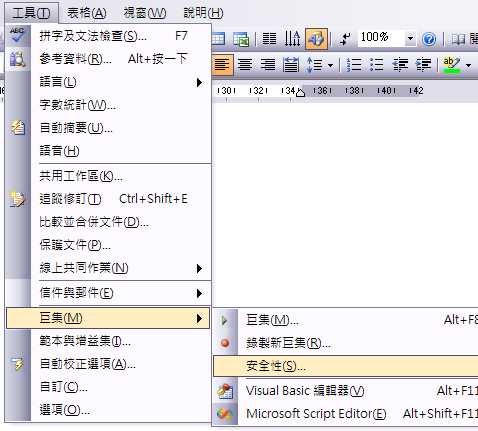
| 2.先開啟word,點選工具-巨集-安全性(如下圖) |
 |
| 2.安全性層級選擇中或低,按確定就完成設定了 |
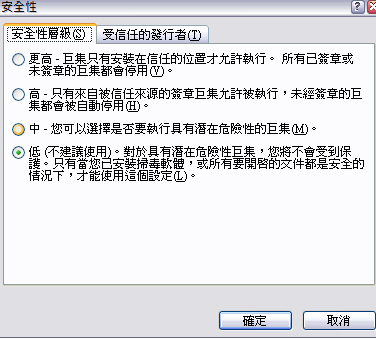 |
| 3.如果安全性選擇中,按公文列印會出現是否啟用巨集,請選擇"是"就可以了 |

| 1.如果在線上簽核中按公文列印沒有動作,有可能就是word中的巨集沒有啟用 |
| 2.先開啟word,點選工具-巨集-安全性(如下圖) |
|
| 2.安全性層級選擇中或低,按確定就完成設定了 |
|
| 3.如果安全性選擇中,按公文列印會出現是否啟用巨集,請選擇"是"就可以了 |